
Technical SEO / Performance / Field guide
Lighthouse for technical SEO: what it measures, what it misses.
A Lighthouse score is not a ranking signal. Learn to read the insights behind it, the tools that go deeper, and the new Agentic Browsing audit, then see the full workflow run on one of our own pages.

By Manikandan Nagappan · AI SEO Expert in Chennai
Most Lighthouse reports end with a score someone wants to push to 100. A useful one ends with a short list of fixes, each tied to a real-user metric, with a way to prove it worked. This guide shows how to get there.
What is Lighthouse, and what is it for in SEO?
Google Lighthouse is an open-source auditor that loads one page in a controlled lab environment and reports on performance, accessibility, best practices, basic SEO and, since 2026, readiness for AI agents. It tells you why a page is slow or hard to use. It does not tell you how real users experience it, and its score is not a ranking factor.
The working method
Use field data to decide what matters, and Lighthouse to find out why. Never the other way round.
The input
Field data first
CrUX and the Search Console Core Web Vitals report show which templates fail for real users.
The diagnosis
Lighthouse insights
LCP breakdown, render-blocking requests, third parties and layout-shift culprits explain the cause.
The output
A verified fix
A ticket with evidence, a CI budget so it can’t regress, and a field check 28 days later.
Where you can run it
| Where | Best for | Watch out for |
|---|---|---|
| PageSpeed Insights | Sharing with stakeholders. Shows CrUX field data above the lab run. | Tests from Google’s servers, not your users’ locations. |
| Chrome DevTools | Quick checks while debugging a page. | Extensions and your machine skew results. Use a guest profile. |
| Node CLI | Scripting, JSON output and custom configs. | Lighthouse 13 needs Node 22.19 or later. |
| Lighthouse CI | Catching regressions on every pull request. | Needs a stable test environment to be meaningful. |
How Lighthouse evolved, release by release
Lighthouse changed more between 2024 and 2026 than in the five years before. The biggest shift: audits became insights shared with the DevTools Performance panel, and a new category now checks whether AI agents can use a page.
Scoring itself has stayed stable. If your dashboards read Lighthouse JSON, check them against 13.x audit IDs before trusting a trend line. Lighthouse 13 release notes ↗
- 2024 · Lighthouse 12
PWA category removed
The Progressive Web App checks left the report. Advice to chase a PWA badge is out of date.
- June 2025 · Lighthouse 12.7
Insights become the default view
The Performance section starts showing insights by default, matching what developers see in the DevTools Performance panel.
- October 2025 · Lighthouse 13
Legacy audits replaced
Old performance audits were removed from the report and the JSON, replaced by insights such as LCP breakdown and layout shift culprits. Performance scoring did not change.
- 2026 · Lighthouse 13.1
Baseline compatibility audit
Flags web features on the page that are not yet broadly supported across browsers.
- May 2026 · Lighthouse 13.3
Agentic Browsing arrives
An experimental fifth category checks how well AI agents can navigate and act on a page. It is the closest thing Google offers to a technical AEO/GEO check.
- 2026 · Lighthouse 13.4 to 13.5
Agentic Browsing in PageSpeed Insights
The category appears in the PageSpeed Insights web report but is excluded from API calls, so bulk scripts won’t return it.
Then: score-first
Run Lighthouse → chase 100 → report the number
Easy to present, but it rewards lab tweaks that real users never feel.
Now: insight-first
Check field data → read the insight → fix the template → verify in the field
The model this guide recommends.
Lab vs field: why your score is not your ranking signal
Lab data is one page load on a simulated mid-range phone over a throttled network. It is reproducible and good for finding causes. Field data comes from real Chrome users over a rolling 28 days, measured at the 75th percentile, and that is what feeds Google’s page experience signals.
“Good” thresholds for Core Web Vitals, measured on field data at the 75th percentile.
INP is where most “Lighthouse says we’re fine” arguments fall apart. It needs real interactions, so Lighthouse reports Total Blocking Time as a stand-in. A page can score 98 in the lab and still fail INP for real users because of heavy event handlers or third-party scripts.
The five categories, read through an SEO lens
Each category answers a different question. Only one of them is called SEO, and it is the least useful for technical SEO work.
| Category | What it tells you | How to use it |
|---|---|---|
| Performance | A weighted blend of lab metrics, plus insights: LCP breakdown, render-blocking requests, network dependency tree, third parties, layout shift culprits. | Ignore the number. Read the insights for failing field metrics. |
| Accessibility | Accessible names, labels, link text, heading order, contrast. | Take it seriously. These are the same signals AI agents rely on. |
| Best Practices | HTTPS, console errors, deprecated APIs, security headers, Baseline compatibility. | Console errors often point to scripts that also break rendering for crawlers. |
| SEO | Basics: indexability, title and description, status code, link text, crawlable links, hreflang, canonical, image alt. | A 100 means no obvious self-inflicted wounds. Nothing more. |
| Agentic Browsing | Whether AI agents can navigate and act on the page. | Experimental. Covered in the next section. |
Agentic Browsing: what Google’s AI-readiness audit actually checks
Added in Lighthouse 13.3, Agentic Browsing scores a page as a pass ratio, not 0 to 100. Its checks fall into three groups.
Accessibility
Agent accessibility tree
A set of accessibility rules for names, labels, title and ARIA. A single violation fails it.
Stability
Layout shift and llms.txt
The same CLS metric as Performance, plus a format check on llms.txt if the site has one.
Integration
WebMCP
Registered agent tools, form annotations and schema validity. A proposed standard in an origin trial; usually not applicable.
Most of this category is accessibility plus layout stability. Independent testers report that the WebMCP checks carry no weight, and no major search engine has confirmed using llms.txt for ranking or citation.
What Lighthouse misses, and what to use instead
Lighthouse audits one URL, once, in a lab. Every question beyond that needs another tool.
| Blind spot | Why Lighthouse can’t see it | Use instead |
|---|---|---|
| Real-user experience | Lab only, no real interactions. | CrUX, Search Console Core Web Vitals, RUM. |
| Site-wide crawl and indexation | One URL at a time. | A crawler, Search Console Page indexing. |
| How Googlebot renders | Runs real Chrome, not Google’s render queue. | Search Console URL Inspection live test. |
| What AI crawlers see | Always runs JavaScript; many AI crawlers don’t. | Raw HTML vs rendered DOM, server logs. See JavaScript SEO render gap analysis. |
| Crawl budget and bot behaviour | No server-side view. | Log file analysis, Crawl stats. |
| Structured data correctness | The SEO category no longer validates schema. | Rich Results Test, Schema.org validator. |
| Real networks and locations | Simulated throttling from one place. | WebPageTest. |
The stack around Lighthouse
The deep technical work, including network and rendering analysis, happens in the tools around Lighthouse.
Traces
DevTools Performance
Flame charts, network waterfall, LCP subparts and real interactions for INP. Insight names match Lighthouse 13.
Networks
WebPageTest
Real devices and locations, CDN and TLS behaviour, HTTP/2 vs HTTP/3, filmstrips.
Ground truth
CrUX
Real-user metrics via PageSpeed Insights, the CrUX API or BigQuery. Fixes take about 28 days to show.
Guardrails
Lighthouse CI
Fails the build when budgets break. The highest-leverage ask a marketer can make of engineering.
Scale
PageSpeed Insights API
Lab and field data into Sheets or BigQuery. Audit one URL per template, not thousands of URLs.
Rendering
URL Inspection
Google’s own rendered HTML and screenshot for the page, to compare against what you expect.
Case study: auditing one of our own pages
We ran the workflow on Backlink audit & link risk analysis, using PageSpeed Insights on mobile.
Lighthouse 13.5.0 · Mobile · Slow 4G · 24 Oct 2026
FCP 3.0 s · LCP 3.0 s · TBT 300 ms · CLS 0 · Speed Index 6.7 s · Field data: none

A perfect SEO score and a full Agentic Browsing pass, on a page that takes 3 seconds to show its main content on mobile. That gap is why you read insights, not scores.
- 1Field data first
No real-user data
PageSpeed Insights shows “No Data” for real users. The post is too new for CrUX, which is normal for most blog posts. Lab numbers are direction, not proof.

No CrUX field data yet, so every number below is lab data. - 2LCP breakdown
The delay is rendering, not the server
The LCP element is the article’s intro paragraph. Time to first byte was fast; almost all the time was spent waiting to paint.
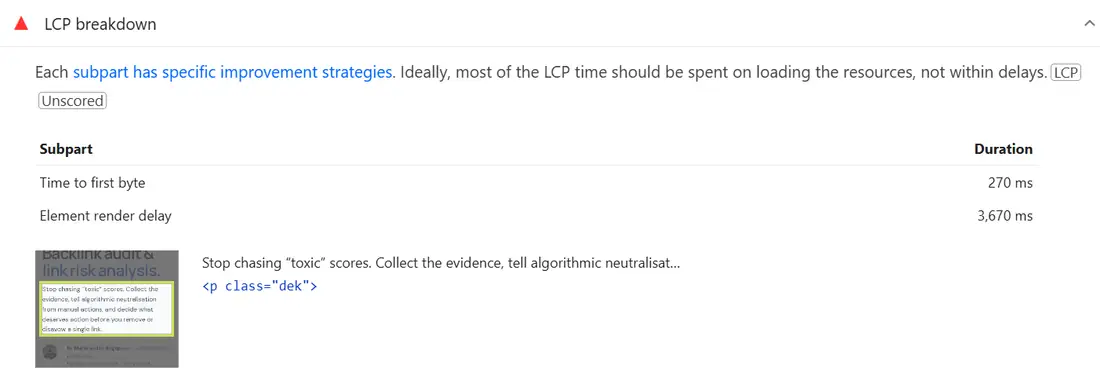
The LCP element is the intro paragraph (p.dek). Render delay, not the server, is the problem. - 3Render-blocking and third parties
Ten blockers and two dead tags
Ten stylesheets and scripts block first paint, including jQuery and form CSS on a page with no form. Google Tag Manager adds about 524 KiB across four scripts, and two of them load a retired Universal Analytics property that collects nothing.
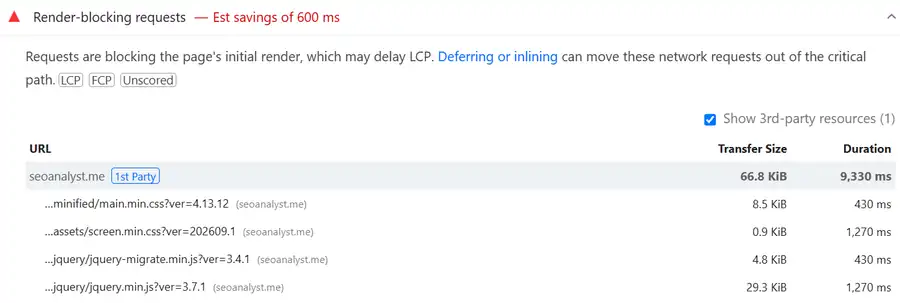
Render-blocking requests (top of the list): theme CSS and jQuery hold back first paint. - 4Agentic Browsing
Passed, but not the whole story
The page passed both scored agent checks. The Accessibility category still flagged low contrast, links that rely on colour alone, and two identically named links to different pages.
The llms.txt result was inconsistent: the site has none (the URL returns 404), yet the mobile run passed the check and the desktop run timed out.
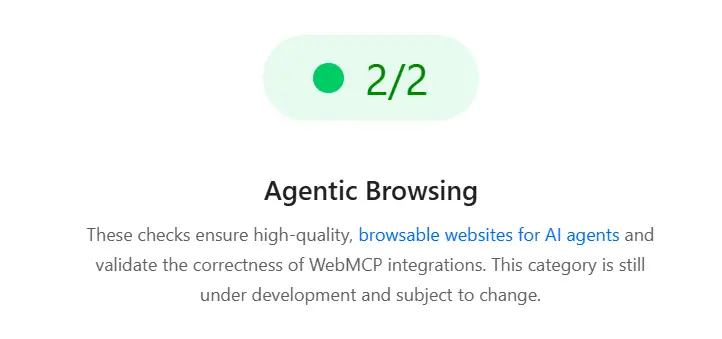
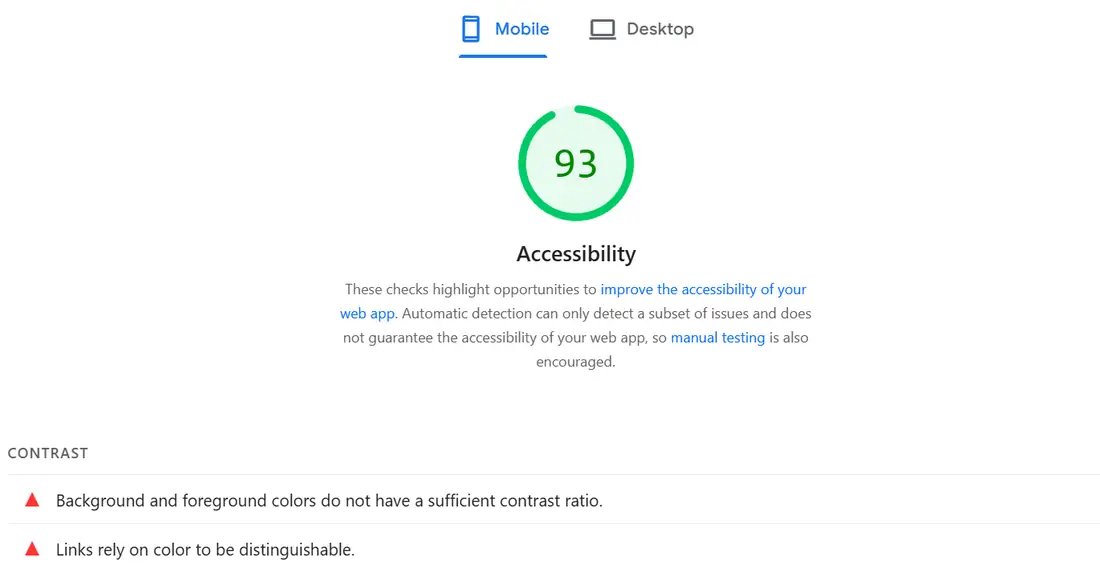
Same page, same run: Agentic Browsing passes 2/2 while Accessibility still flags contrast failures. - 5Render check
AI crawlers see the full article
Raw server HTML and the rendered page matched: about 3,740 vs 3,770 words, the same 19 headings, the same 124 links, and all structured data present before JavaScript runs.
- 6Fix list
Five fixes, in order
Remove the retired Universal Analytics tags; defer jQuery and scope form and widget CSS to pages that use them; self-host fonts or preconnect with
font-display: swap; fix contrast and underline in-text links; remove the forced reflow from an inline script. - 7Before and after
Re-run after the fixes ship
Same settings, median of three to five runs. Results will be added here.
From Lighthouse report to developer ticket
A finding only matters once someone can act on it. This is the sequence we use, and the ticket it produces.
| Step | What to do |
|---|---|
| 1. Pick templates | List page types and one or two representative URLs for each. |
| 2. Check field data | Note which templates fail which metric on mobile. |
| 3. Run Lighthouse | Three to five runs on failing templates; take the median. |
| 4. Map to insights | LCP → LCP breakdown; CLS → layout shift culprits; INP → a DevTools trace. |
| 5. Check agents and rendering | Run Agentic Browsing and compare raw HTML with the rendered page. |
| 6. Write the ticket | Evidence, cause, fix, verification and a CI budget. |
| 7. Verify in the field | Check CrUX after 28 days. |
Template:     Blog post
Example URL:  /backlink-audit-framework/
Field (CrUX): no data
Lab (PSI):    LCP 3.0 s · TBT 300 ms
Insight:      LCP breakdown → render delay 3.7 s
Cause:        10 render-blocking files; 2 retired UA tags via GTM
Fix:          remove UA tags; defer jQuery; scope form CSS to form pages
Verify:       lab LCP under 2.5 s on mobile, median of 5 runs
Guardrail: Lighthouse CI budget, LCP ≤ 2500 ms on this templateCommon Lighthouse mistakes
Seen in real audits
Habits that waste sprints
- Reporting the Performance score to leadership as a KPI.
- Testing on desktop only, when mobile is where Core Web Vitals fail.
- Trusting a single run instead of a median.
- Running Lighthouse in a browser full of extensions.
- Treating SEO = 100 as “technically sound.”
- Chasing WebMCP or llms.txt before fixing accessible names and CLS.
- Fixing URLs one by one instead of fixing templates.
Lighthouse questions.
Does a higher Lighthouse score improve rankings?
Not directly. Google uses field Core Web Vitals as part of page experience, not your lab score. Lighthouse helps you find what is hurting field metrics.
Why do Lighthouse and PageSpeed Insights show different numbers?
Different hardware, location and network conditions. PageSpeed Insights also shows CrUX field data, which reflects real users rather than one simulated load.
Can Lighthouse measure INP?
No. INP needs real user interactions. Lighthouse reports Total Blocking Time as a lab proxy; use CrUX for INP and DevTools traces to debug it.
What is the Lighthouse Agentic Browsing category?
An experimental category added in Lighthouse 13.3 that checks how usable a page is for AI agents: accessibility tree quality, layout stability, llms.txt format and WebMCP integration.
Do I need WebMCP or llms.txt for AEO and GEO?
Not today. WebMCP is a proposed standard in an origin trial, and llms.txt is unconfirmed as a ranking or citation input. Accessible, server-rendered, stable pages matter more.
Is Lighthouse enough for a technical SEO audit?
No. It audits one page in a lab. Pair it with a crawler, Search Console, field data, server logs and render checks.
Keep reading
 How-to · Field guideSEO checklist for Google & AI search28+ checks for access, content quality, trust and AI visibility, with a workbook.
 How-to · Search ConsoleSearch Console data at scale: export it, query it, trust itExport more than 1,000 rows, set up BigQuery and run 12 SQL investigations.
 Technical SEO · Deep diveLog file analysis for SEO and AI crawlersVerify Googlebot, find crawl waste and check which AI crawlers reach your site.
Making sense of a Lighthouse report?
Send me the question. I read every note.