
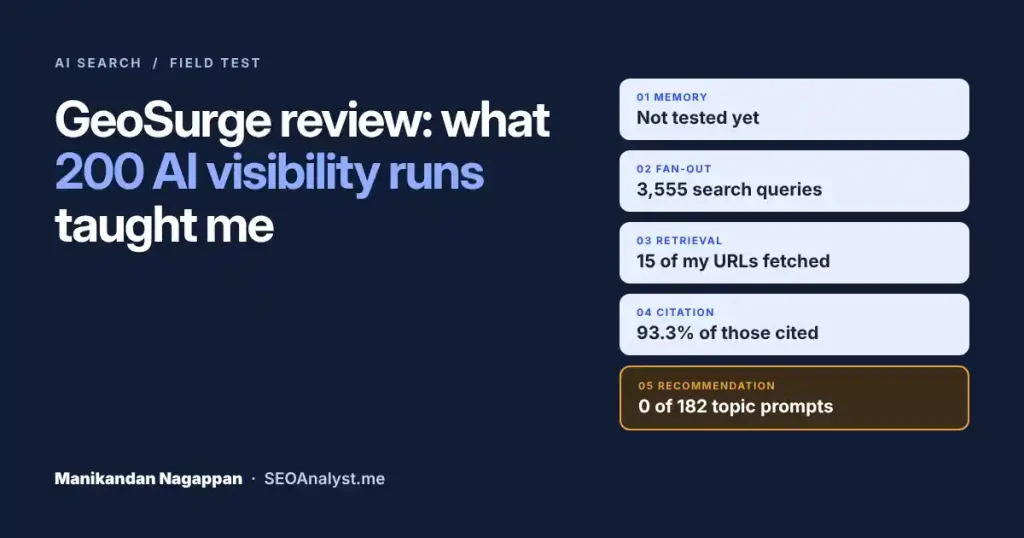
AI search / GEO / Field test
I tested SEOAnalyst.me in GeoSurge.
Here’s what 200 runs taught me.
I set up 200 prompts about my own work and let GeoSurge track them through ChatGPT. Here’s what it took to run, what the dashboard showed, and the gap a single visibility score was hiding.

By Manikandan Nagappan · AI SEO Expert in Chennai
AI visibility tools offer a view search teams have never had: what ChatGPT, Claude and Gemini say when someone asks about your space. I wanted to know what that view takes to run, and what it really shows. So I ran an experiment with the SEOAnalyst.me website in GeoSurge.
Why run this experiment with the SEOAnalyst.me website?
For Google, I open the evidence before I make a claim: Search Console data, a crawl, the server logs. AI answers have no equivalent. No report shows why a model named one brand, searched for another and cited a third. Trackers like GeoSurge sample those answers for you, which makes them the closest thing we have to instrumentation.
I chose SEOAnalyst.me because I know the ground truth: what I’ve published, what I haven’t, and where I’d expect to show up. That makes surprises easier to read. It’s the same habit behind my evidence-first backlink audits: treat the tool’s number as a question, not a verdict.
The setup
200 prompts across 26 topics. 18 prompts name me or SEOAnalyst.me. The other 182 are topic questions about what I write on, such as JavaScript SEO, log files and content gaps. Tracking started on 27 Oct 2026, and every figure here comes from the ChatGPT responses collected since then.
200 prompts
Branded and topic questions, written the way people actually ask.
Read by definition
Each metric checked against GeoSurge’s own tooltip before I interpret it.
Hypotheses
What to test next, not a score to celebrate or worry about.
How does GeoSurge work?
GeoSurge is a London-based AI visibility platform. Its free tier tracks how AI models answer the prompts you choose, then records brand mentions, competitors, the searches the model ran and the sources it cited. There are two ways to run it.
Desktop app
Runs on the AI plans you already have
Sign in with ChatGPT, Claude or Gemini (Gemini is in beta). Prompts run on your computer and results sync to the web dashboard. Available for macOS on Apple silicon, Windows 10/11 and Linux.
Your own key
Runs in the cloud with OpenRouter
Connect an OpenRouter account and pay its model rates directly. GeoSurge shows a cost estimate before tracking starts and adds no markup.
The desktop app checks every hour for prompts that are due. Projects collect daily by default, and runs missed while your computer sleeps catch up later. GeoSurge’s pricing page lists unlimited prompts, projects and seats on the free tier, plus CSV/JSON export, a REST API and MCP access.
Two notes in its documentation are worth reading early. Provider usage limits apply: when a provider limits requests, the app waits and retries after the reset. And the app warns you when your enabled prompts exceed your run budget. Both matter for the next section.
Free AI visibility tracking isn’t free: where the cost sits
GeoSurge doesn’t charge for tracking. Its pricing page says the desktop app “runs on the ChatGPT, Claude and Gemini plans you already pay for.” That’s accurate: there’s no GeoSurge bill. But every prompt is still a full AI answer, and that work is paid for somewhere.
200
The point at which I checked usage.
5.9 million
Across those 200 runs.
≈ 29,500
5.9M ÷ 200, worked out by me.
Why so many tokens per run? My reading, not a GeoSurge figure: these are web-searching answers. Across 1,618 ChatGPT responses, GeoSurge logged 3,555 different search queries. That’s more than two per response on average, and each search pulls pages into the model’s context.
Where the bill lands
On a subscription
Tracking shares your plan’s allowance
Your prompts draw on the same allowance you use for daily work. A heavy tracking day can bring you closer to your plan’s usage limits.
On your own key
You pay the model rates directly
Cost scales with the models, prompts, locations and frequency you choose. GeoSurge’s docs note that small models cost far less per run than flagship ones.
The usage formula
Prompts × models × collection frequency = usage. Double any one of them and usage roughly doubles. That’s the lever to plan around before adding prompts.
For context, GeoSurge’s pricing page lists other prompt trackers at $29–495 a month plus add-ons. Those tools bundle model costs into the subscription. GeoSurge lets you supply them yourself. Neither approach is better by default: it depends on the plans you already pay for and how many prompts you need.
What did the dashboard show, and how should you read it?
Here’s my Visibility view. Before reading any number, I hovered over its info icon and noted GeoSurge’s own definition.
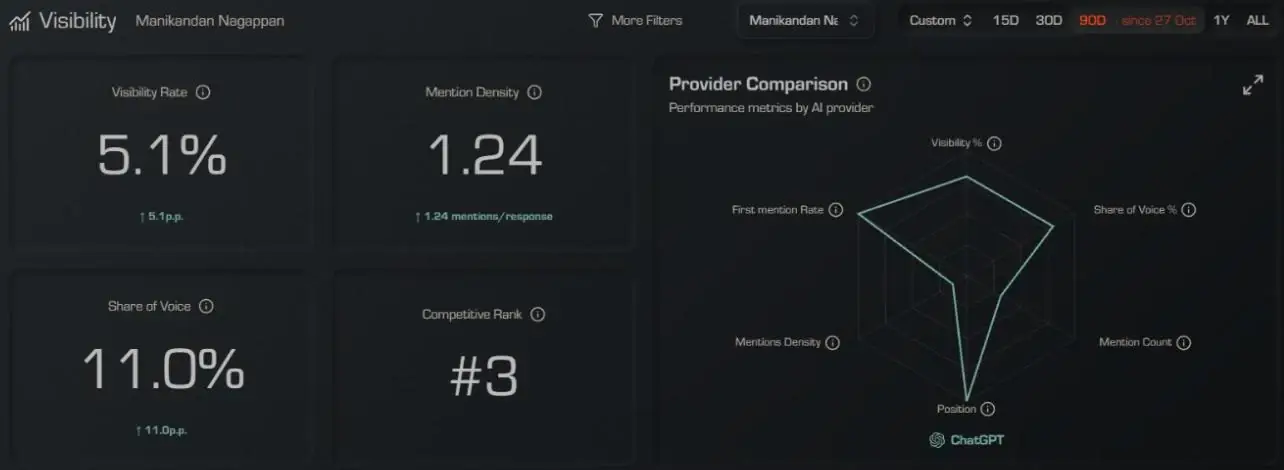
| Metric | Mine | GeoSurge’s definition | How I read it |
|---|---|---|---|
| Visibility Rate | 5.1% | Share of AI responses that mention your brand. | Roughly 1 in 20 responses named me. |
| Mention Density | 1.24 | Average mentions when the brand appears in a response. | When I’m named, it’s usually once. |
| Share of Voice | 11.0% | Your share of all brand mentions, compared with every tracked brand. | Relative to the brands I chose to track. |
| Competitive Rank | #3 | Rank among tracked competitors by visibility. Lower is better. | Third on my own list, not in the market. |
The split that changed my reading
5.1% is an average across all 200 prompts. Split by prompt group, it tells a very different story.
Every mention came from the 18 prompts that use my name or my site’s name. Across the 182 topic prompts, the questions people ask before they know who I am, ChatGPT didn’t name me once.
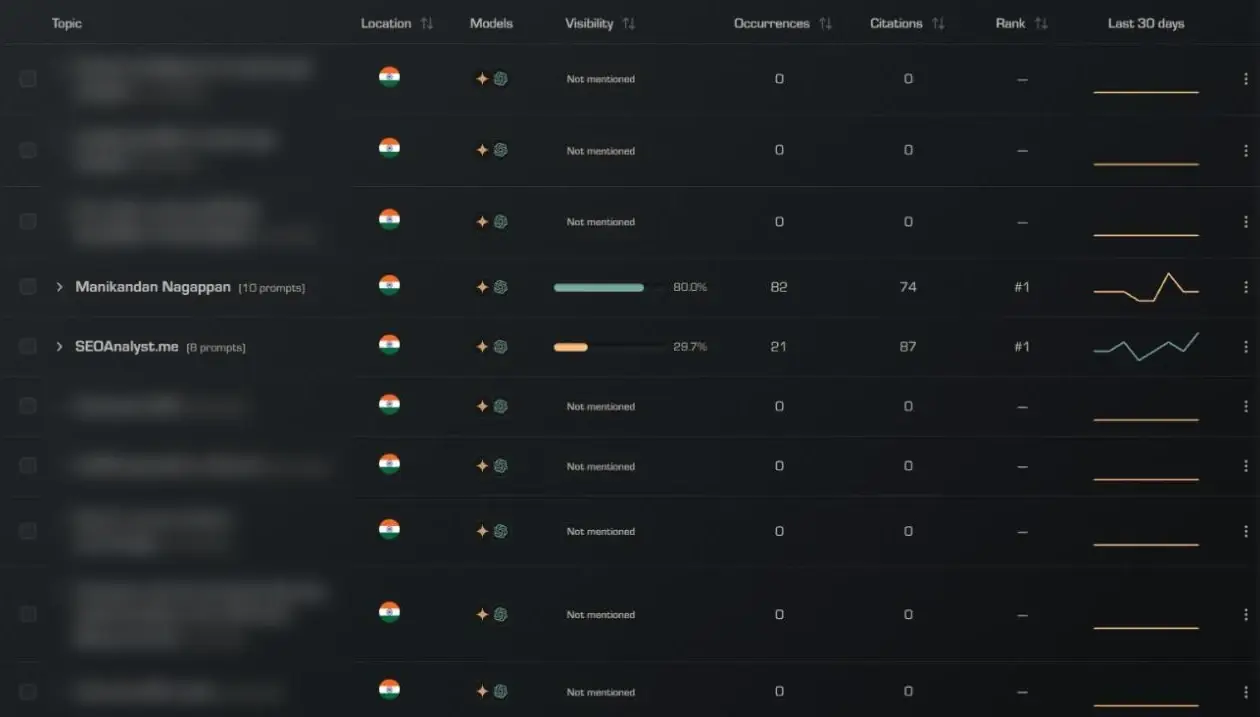
That’s why branded and topic prompts belong in separate reports. Mixed together, branded prompts lift the average and hide the gap.
There’s a personal-brand wrinkle too. My brand is tracked as “Manikandan Nagappan”, so an answer that cites SEOAnalyst.me without using my name doesn’t count as a mention. “What topics does SEOAnalyst.me cover related to AI search?” earned 18 citations of my site and zero brand mentions.
What sits beneath the score? Manikandan’s AI Visibility Gates
A visibility rate folds several steps into one number. I find it more useful to read an AI answer as five gates. A brand can pass one gate and stop at the next.
- 01
Memory
Does the model link me to a topic without searching? GeoSurge calls this parametric visibility: answers given from memory only, with no sources. I haven’t tested this gate yet. It’s my next experiment.
- 02
Fan-out
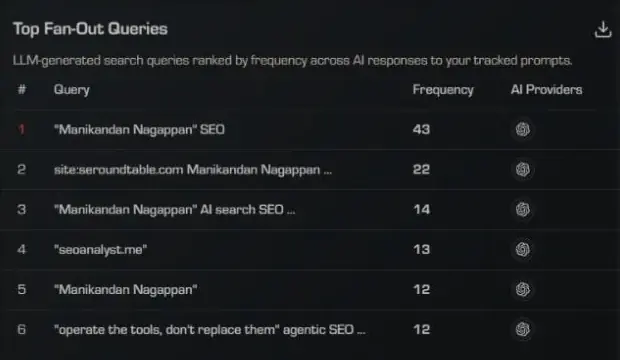
Does the model go looking for me? Fan-out queries are the searches a model runs before it answers. GeoSurge logged 3,555 distinct search queries. The most frequent, “Manikandan Nagappan” SEO, ran 43 times. The model searches for me when the prompt names me.
- 03
Retrieval
Does it fetch my pages? GeoSurge calls live retrieval dynamic visibility. 15 unique SEOAnalyst.me URLs were retrieved. Outside GeoSurge, I check this in server logs for AI crawlers and with a render gap check.
- 04
Citation
Does it link to me inline? Source Conversion Rate was 93.3%: 14 of the 15 retrieved URLs were cited. Overall, 6.4% of responses cited my site, and all 161 citations came from branded prompts.
- 05
Recommendation
Does it name me as part of the answer? Zero mentions across 182 topic prompts. This is where my brand stops.
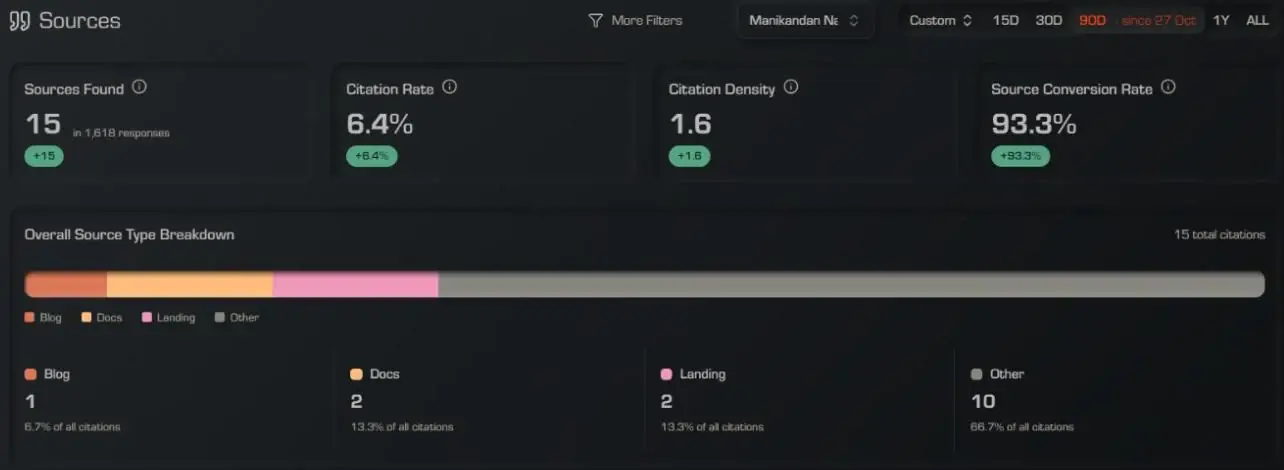
Read together, the gates tell a clear story. When someone asks about me, ChatGPT searches, finds my pages and cites them almost every time. When someone asks about the topics I write on, none of that happens: no mention and no citation across 182 topic prompts. My pages can be found by name. They aren’t yet part of the topic answers.
What I liked, and what I’m still testing
Clear, inspectable data
A clean dashboard for visibility, mentions and share of voice. Prompt tracking with competitor comparisons and cited sources. Automated runs instead of repeating searches by hand. And a definition behind every metric, one hover away.
Consistency over time
How stable results are from one collection to the next. How other models compare once they’re collecting. And whether topic visibility moves as I publish deeper content on those topics.
Who is GeoSurge a good fit for?
It depends less on the tool and more on your plans, your prompt volume and how much help you need.
| Your situation | Fit | Check first |
|---|---|---|
| You already pay for AI plans and track a modest prompt set | A natural fit | How tracking affects your own daily usage. |
| Large prompt sets or several brands on your own key | Workable | The cost estimate GeoSurge shows before you start. |
| You want a managed service with strategy support | Look at enterprise options | Scope and pricing with the vendor. |
| A personal brand or small site | A useful baseline | Separate branded and topic prompts from day one. |
Whatever your setup, pair the tracker with evidence you already own. AI referral traffic in GA4 is one example; my regex filters for GA4 and Search Console include patterns for isolating it.
GeoSurge questions.
Is GeoSurge free?
The tracking software is free. The model usage comes from your AI plan’s allowance or, with your own key, from OpenRouter token costs. In my test, 200 runs used 5.9 million tokens.
Does GeoSurge use my ChatGPT or Claude subscription limits?
Yes. GeoSurge’s docs say provider usage limits apply, and the desktop app waits and retries when a limit resets.
How often does GeoSurge run prompts?
The desktop app checks every hour for prompts that are due. Projects collect daily by default, and the pricing page also lists every two days or weekly.
Is AI visibility tracking accurate?
Treat it as sampled evidence. Answers vary between runs and models, so read trends across several collections rather than any single result.
Should I track branded or non-branded prompts?
Both, reported separately. In my data, 18 branded prompts produced every mention, while 182 topic prompts produced none.
Run your own baseline
Start with the prompts that don’t name you.
Write 10 to 20 questions your audience asks before they know your brand. Track them for two weeks before you change anything. That’s your real starting point.
Keep reading
 Technical SEO · Deep diveLog file analysis for SEO and AI crawlersVerify Googlebot, find crawl waste and check which AI crawlers reach your site.
 Technical SEO · Field guideLighthouse for technical SEOWhat each category measures, the Agentic Browsing audit, and what it misses.
 How-to · Search ConsoleSearch Console data at scale: export it, query it, trust itExport more than 1,000 rows, set up BigQuery and run 12 SQL investigations.
Testing AI visibility on your own brand?
Send me what you found. I read every note.